GitHub rebasing for the terrified

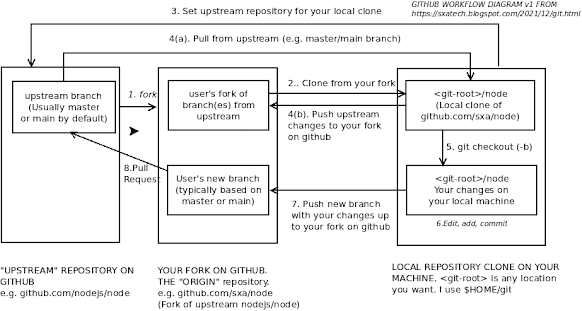
This is a follow up to my GitHub primer post where I introduced how most of the git concepts. One of the things that catches a lot of people out when the first use git is the idea of rebasing. While you're working on the code base, other people can be working in their own forks, and things can get out of date and this can cause problems when you go to merge your changes back in. So how do you avoid getting into "rebase hell"? This is the stuff I wish I'd properly appreciated before I started, and includes the commands I use to get out of problems. I'm going to repeat the diagram from the previous post because I'm going to refer to some steps in it by number: I'm going to refer to the "main" branch here as it;s now the default that GitHub creates, but many repositories will still be using the old default of "master" used upstream development branch. If your project uses "master", or you're working from an alternate upstrea...